Power Usage Effectiveness (PUE)

Updated over a week ago
Power Usage Effectiveness, or PUE, is uniquely used for data centers. It is a measure of how efficiently a computer data center uses energy, or more specifically, how much energy is used by the computing equipment in contrast to the energy used by the cooling equipment.
You can access the PUE tool by navigating to the 'stacked coin' icon.
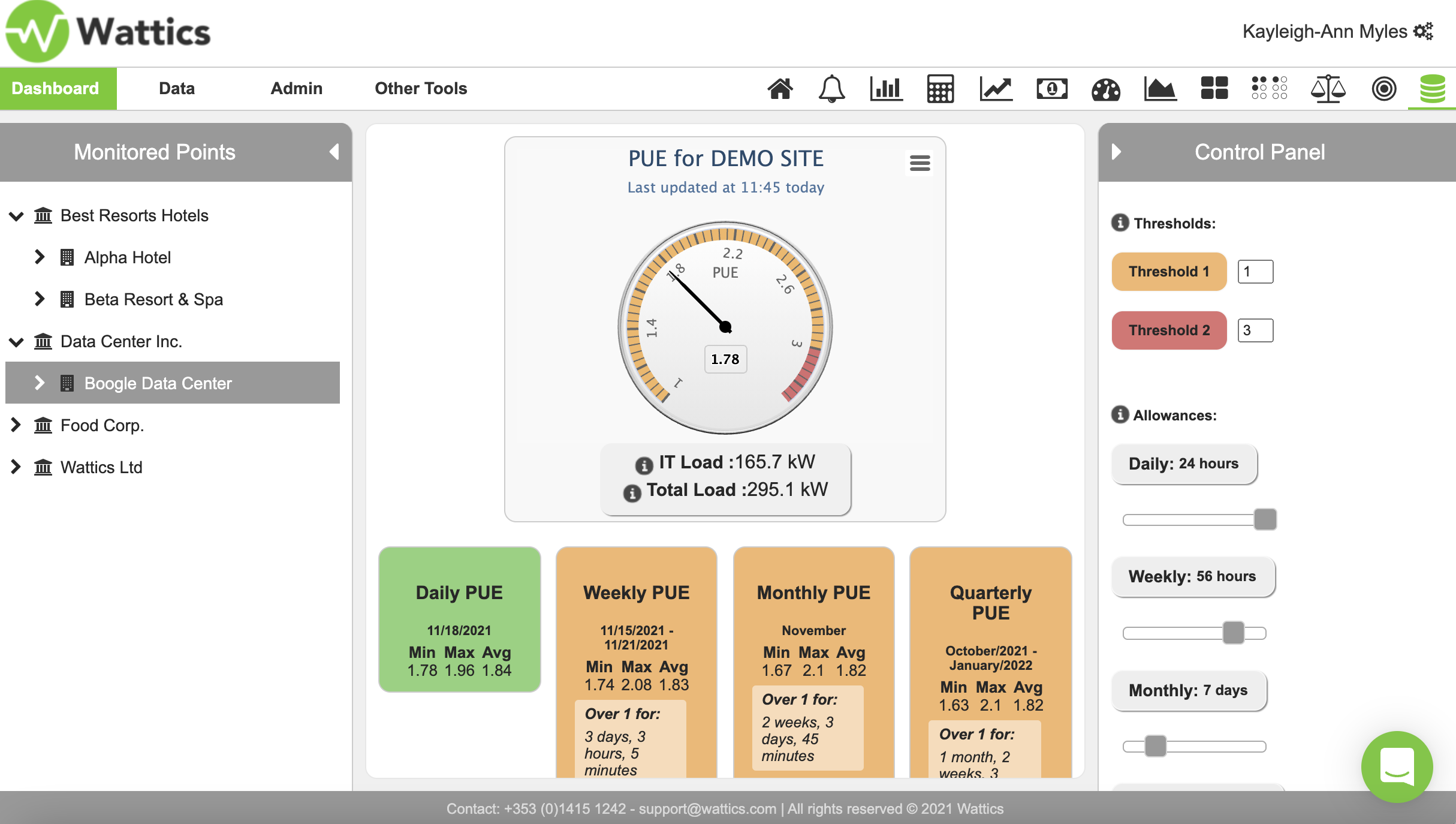
The ideal PUE for maximum efficiency is 1 and it is preferred to stay between 1 and 2. On the right hand side are the indicated thresholds. If you want to be notified when the PUE exceeds 1.8 or 2.5 you have an orange and red notification setting.
The allowance lets you set how long or how many hours the PUE can exceed the threshold and will only notify you if the cumulative amount of time is greater than a limit you set. If you click on the daily PUE, the graph will show you how the PUE is calculated. You can click on each server and appliance to see how much energy they are consuming.
The weekly or monthly PUE will show the average minimum and maximum values. The quarterly PUE can be compared with a temperature to see if weather plays a role in cooling energy usage. All of these PUE settings can be added to your notifications so that you get alerted immediately if there is an issue detected by AiElements.
These PUE event notifications will appear on your home page or be sent to you via email or SMS.